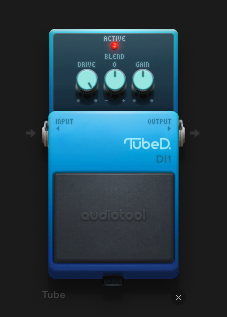
The Tube Distortion effect pedal compresses or clips the audio signal adding sustain and overtones, giving a richer sound. The Tube can be cranked to achieve mega loud dirty industrial hardcore grunge or can be used more conservatively by adding subtle overdrive, giving warmth and thickness to the original signal.
*drive - Allows adjustment of the how much distortion is applied to the original signal.
*blend - Changes the character of the distortion.
*gain - Output volume.
Comments (12)
fav pedal
i usually put four of these on my basses :)
along with some phasers, of course
What does the blend knob actually do?
It changes the shape of the waveform the distortion tends to. Here's an explanation: https://www.manula.com/manuals/audiotool/audiotool-user-manual/1/en/topic/devices-tube-controls
Thanks. Is a circle wave essentially like a rounded sine wave? The way I understand it is that the higher the tone control goes, the more clipped the top of the waveform becomes, until I presume it rectifies the entire top half of the waveform.
Yes. That's correct. At least, that's the kind of wave I got when distorting a pure sine wave. In any case, the Blend knob controls the "colour" or tone of the distortion. I personally always prefer the left side.
Automate the drive in a downwards saw shape on a sine wave to get a sort of square pluck.
Also, use the band splitter and just apply the distortion to the low end to get warmth without a harsh sound.
how do you automate effects like distortion and reverb in the studio?
Right click a control and choose "Automate Parameter" in the context menu. Then either click Record and move the control or create an automation region with key-frames in it.
For a better overview of your requests, we ask you to post questions about help for this device on our HELP board https://www.audiotool.com/board/support
And if you have found a bug, post it here at the bug reports https://www.audiotool.com/board/bug_reports
Thanks